Inbecto, a Lywin product

Inbecto: quote the job, run the project, get paid and look after the client.

Inbecto is business software from Lywin. It follows a job in the order the work happens: the enquiry and site visit, the quotation, the project on site, the GST invoice and payment, and the service call after handover.

First month free, no card. The demo shows a sample company.

Made for

  • Interior designers
  • UPVC and aluminium window and door makers
  • Modular kitchen and furniture makers
  • Turnkey interior and construction companies
  • Contractors and renovation businesses
demo.inbecto.com
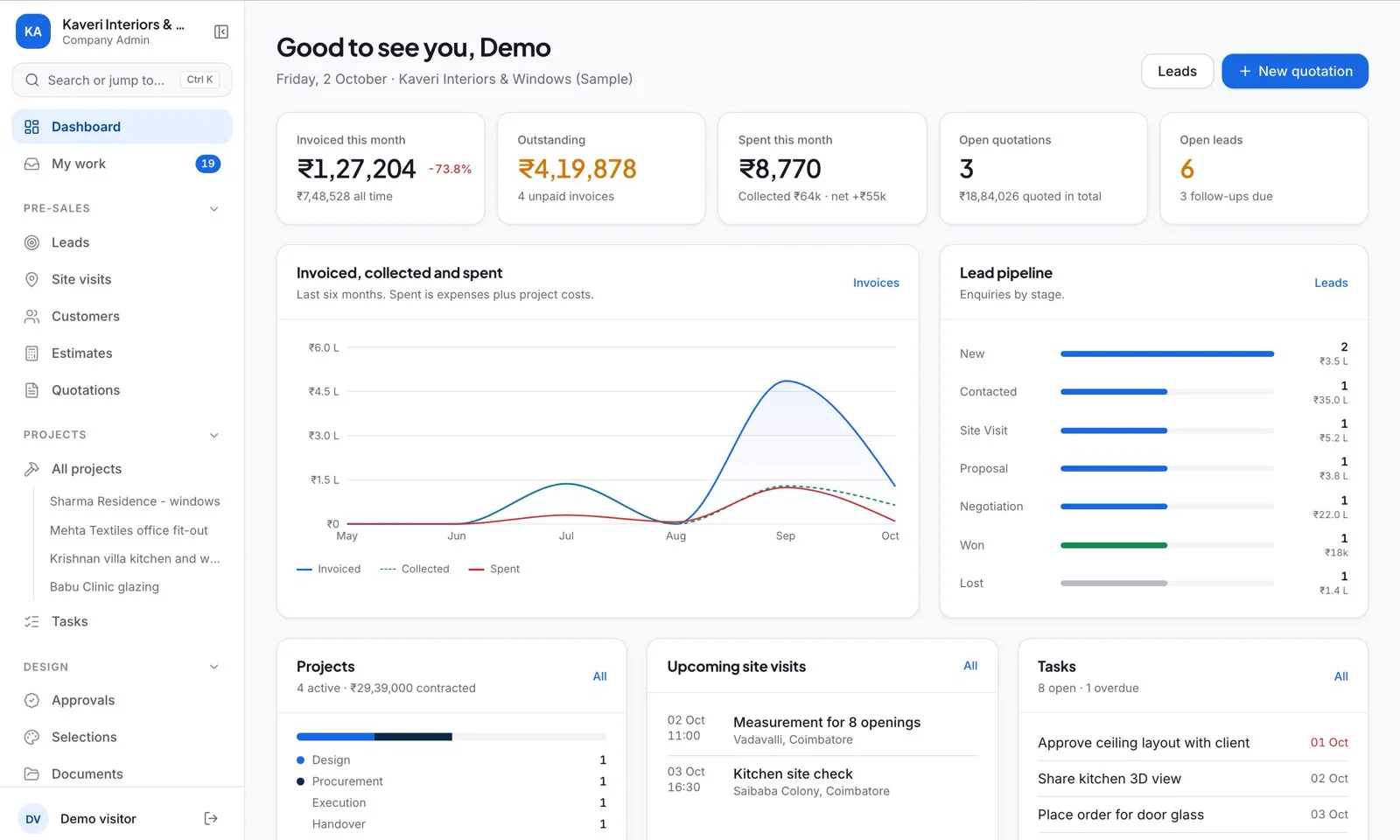
Inbecto dashboard for a sample company: invoiced this month, outstanding, spent, open quotations and open leads, a six-month chart and the lead pipeline

The Inbecto dashboard in the demo workspace, a sample company called Kaveri Interiors & Windows.

Watch Inbecto at work

A walkthrough of the app, about 3 minutes, using the demo company’s own screens. Nothing plays until you press play.

Inbecto follows the job

The menu is grouped in the order work happens, from Pre-sales through Projects and Finance to Handover & service. Each stage below is a real screen from the demo.

  1. Pre-sales

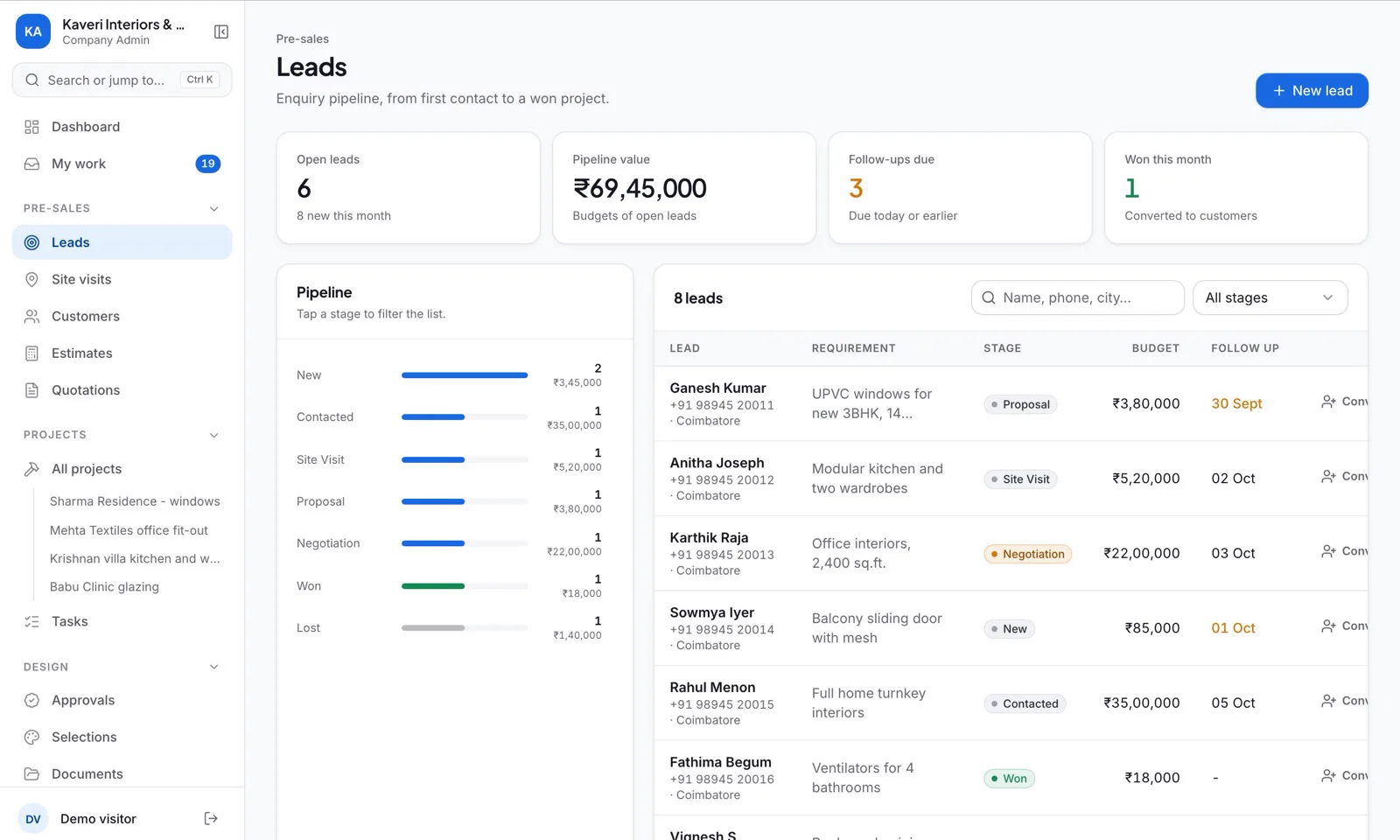
    Every enquiry gets a record, with where it stands and when to call back.

    • Leads move through New, Contacted, Site visit, Proposal, Negotiation, Won and Lost, each with a budget, a source and the next follow-up date.
    • Measurement and installation visits are booked with a date and time.
    • Customer records hold contact details, site address and GSTIN, with everything for that customer linked to it.
    demo.inbecto.com
    Inbecto leads screen for a sample company, showing the enquiry pipeline by stage with budgets and follow-up dates
  2. Quotations

    Type the size, and the area and the price are worked out from your rate.

    • Pick a product from your Product Master and enter the width and height in millimetres, feet, inches or metres, with the quantity. Area and amount follow from your rate.
    • For windows and doors, choose the style, panels, tracks, mesh, top light and fan cut-out, and the drawing updates. You can upload your own drawing instead.
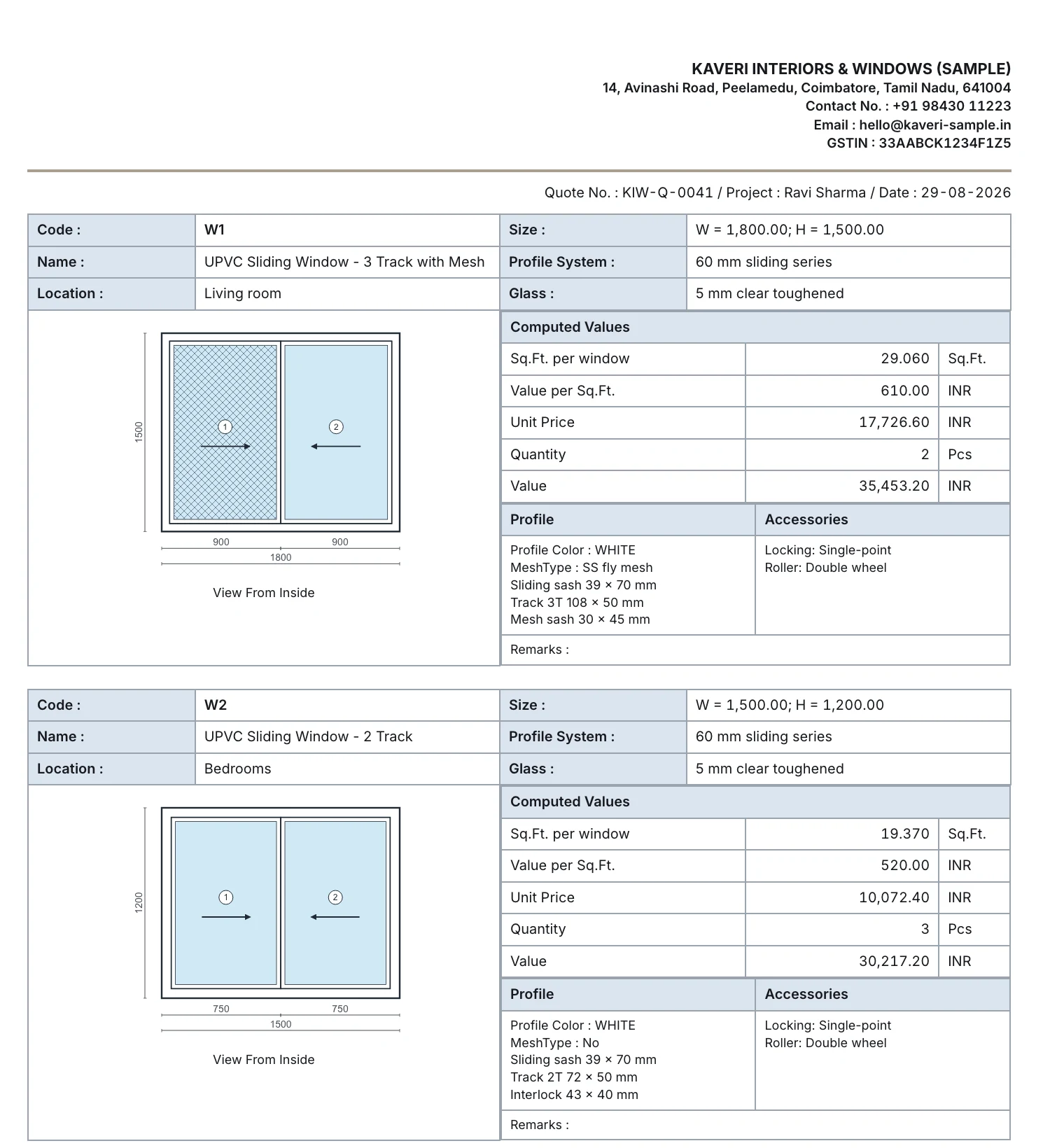
    • A UPVC window quotation prints one block per window, with its drawing, sizes, profile, glass and hardware.
    • Add discount, other charges and GST, then download a branded PDF or share it on WhatsApp as a private link that opens on any phone with no login.
    • Mark it accepted, then create the project and raise the invoice from the same page.
    Page two of a UPVC window quotation made in Inbecto for a sample company: the letterhead, then a block for window W1 with its drawing, sizes in millimetres, profile, glass, hardware, and the computed area and price
    Page two of a UPVC window quotation made in the demo for a sample company: the letterhead, then one block for each window with its drawing, sizes, profile, glass and hardware. See the whole page, both windows
  3. Projects

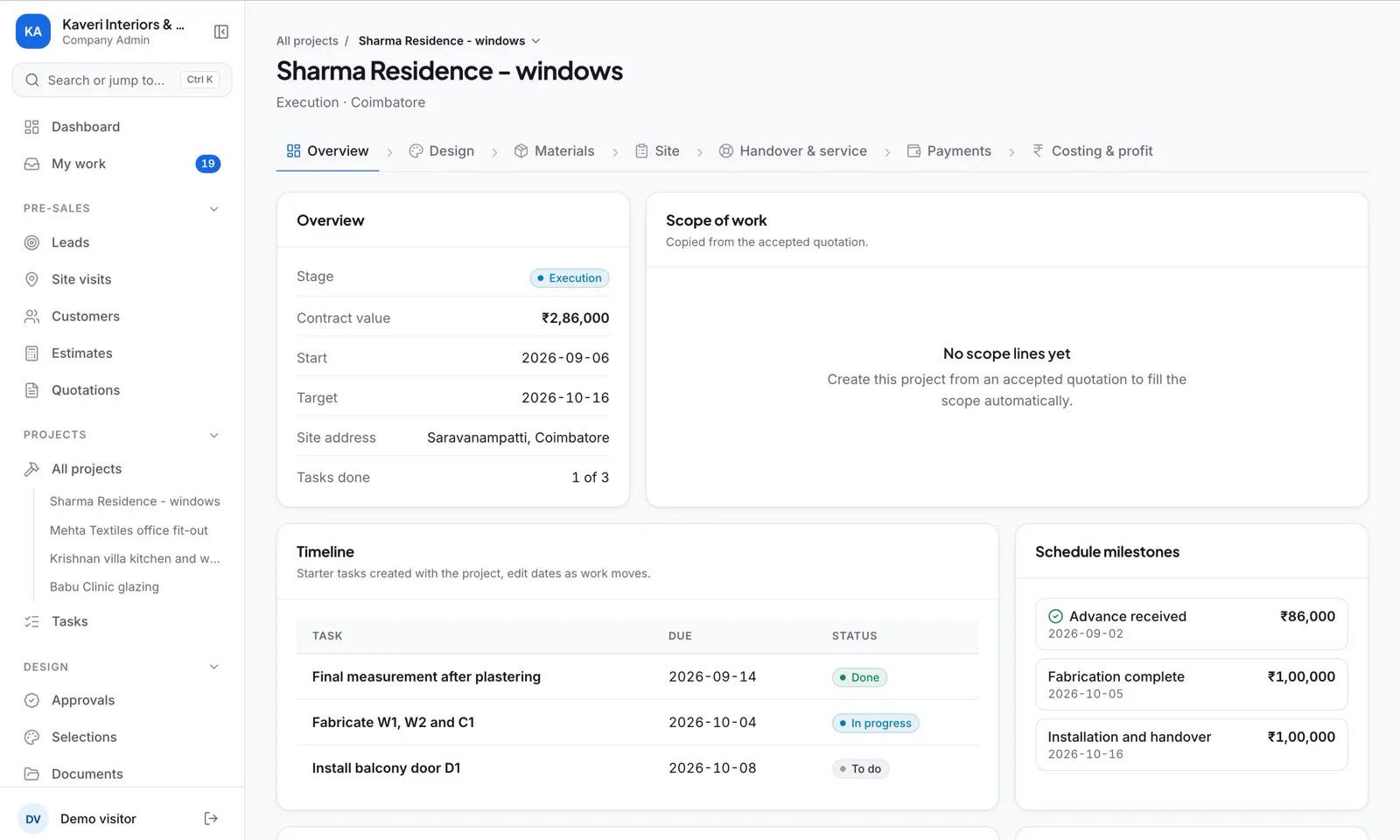
    Every job is a project, with its stages, tasks and documents in one place.

    • A stage bar runs along each project: Overview, Design, Materials, Site, Handover & service, Payments, Costing & profit.
    • Tasks sit with the project, and design approvals and selections record what the client has approved.
    • Documents are kept with the project. Click the project name to switch to another job.
    demo.inbecto.com
    Inbecto project overview for a sample window job, with stage, contract value, dates, a task timeline and schedule milestones
  4. Purchasing and site

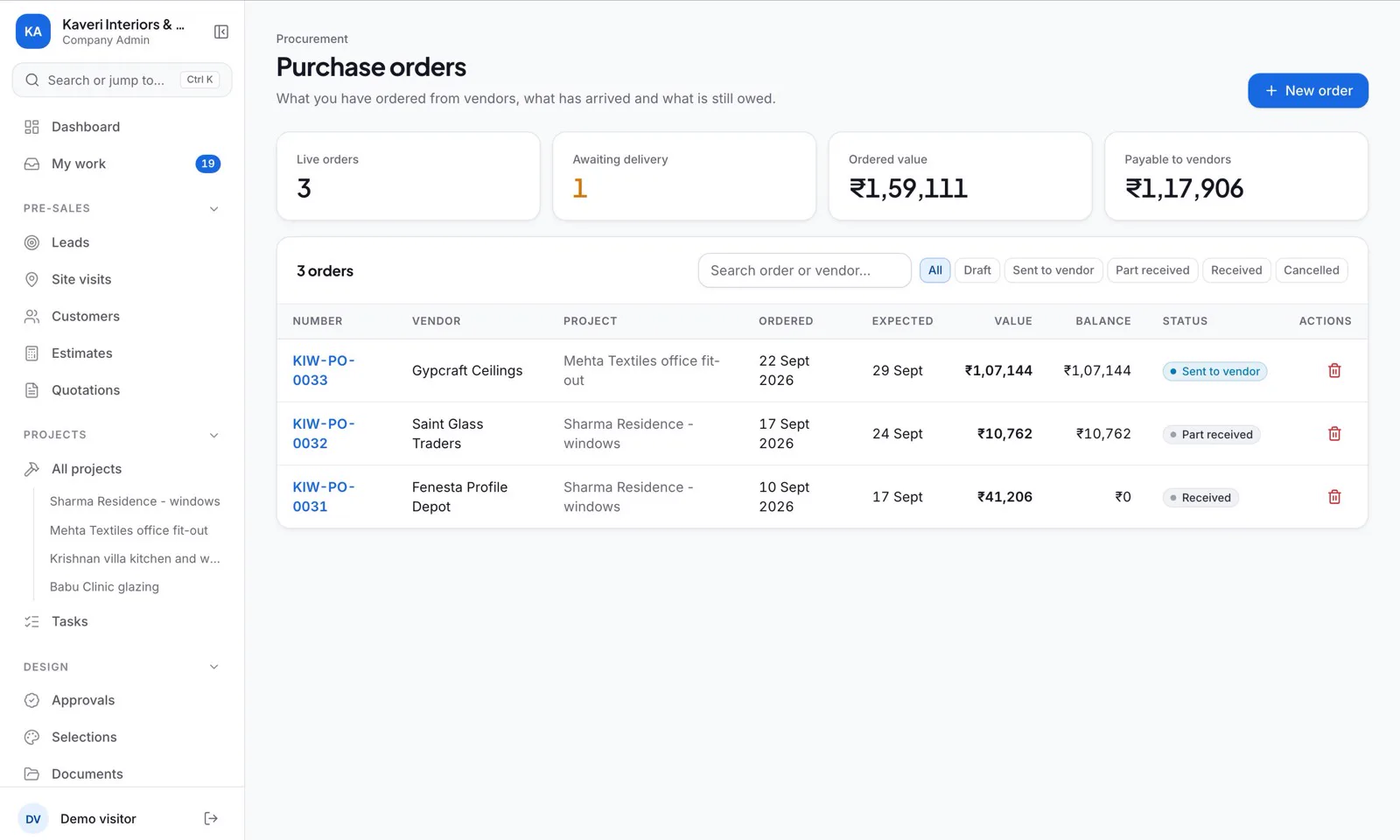
    See what has been ordered, from which vendor and for which project.

    • Vendors, purchase orders and materials, with the value, the balance and the status of every order.
    • Work orders and site reports record what is being done on site.
    • Wage workers are tracked across all four segments.
    • Expenses are recorded and totalled by head.
    demo.inbecto.com
    Inbecto purchase orders screen for a sample company, listing orders with vendor, project, value, balance and status
  5. Costing and profit

    See what a job cost and what it made, job by job.

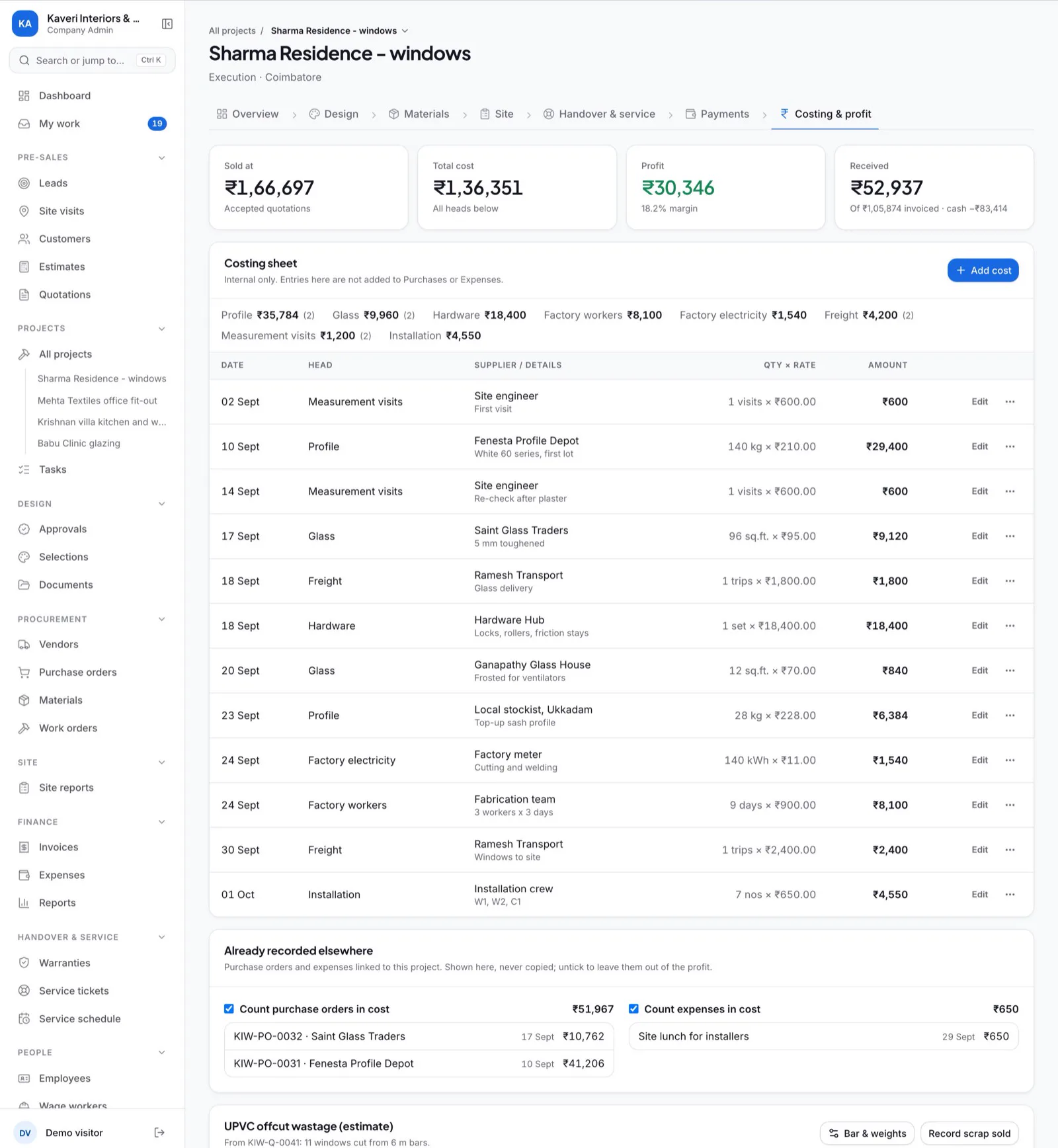
    • A costing sheet for profile, glass, hardware, factory labour, electricity, freight, measurement visits and installation, with as many entries as you need.
    • Total cost sits next to the price you sold at and the money received, with the margin worked out.
    • Linked purchases and expenses are shown against the job.
    • For UPVC, an estimate of offcut wastage by weight.
    demo.inbecto.com
    Costing and profit screen for a sample window project, with sold at, total cost, profit and money received above the costing sheet
  6. Invoices and GST

    Bill with the right tax details, and see who has paid and who has not.

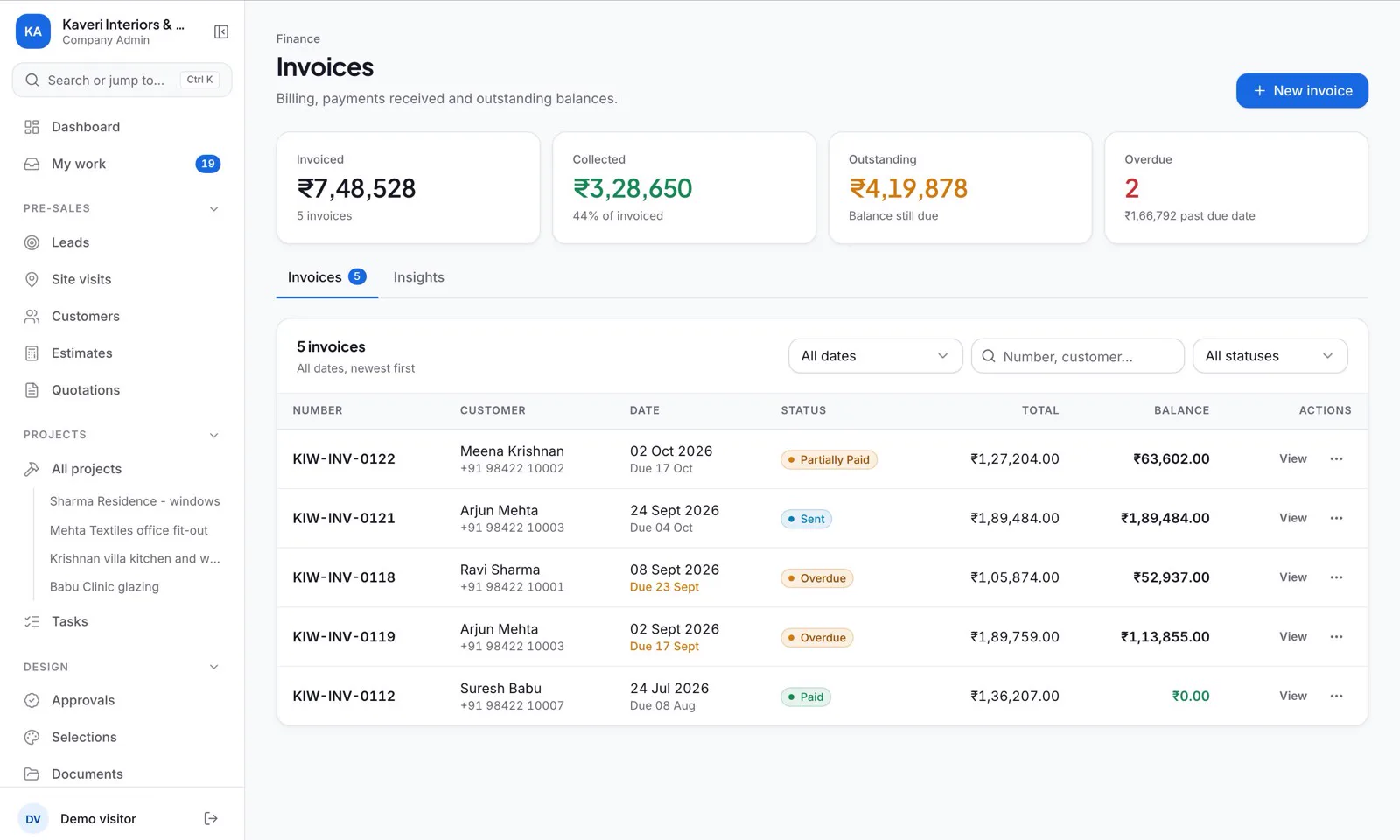
    • Tax invoices carry HSN or SAC codes and GST.
    • Record payments by cash, UPI, bank or cheque. The balance and the status update on their own, and period filters narrow the list.
    • For an e-way bill, Inbecto prepares the JSON file for the government portal’s bulk upload. Type the 12-digit number back and it prints on the invoice.
    • Only a company admin can delete an invoice, and must type its number to do it. Everyone else marks it cancelled.
    demo.inbecto.com
    Inbecto invoices screen for a sample company, listing invoices with customer, date, status, total and balance
  7. After handover

    Complaints and maintenance after handover are recorded against the job they belong to.

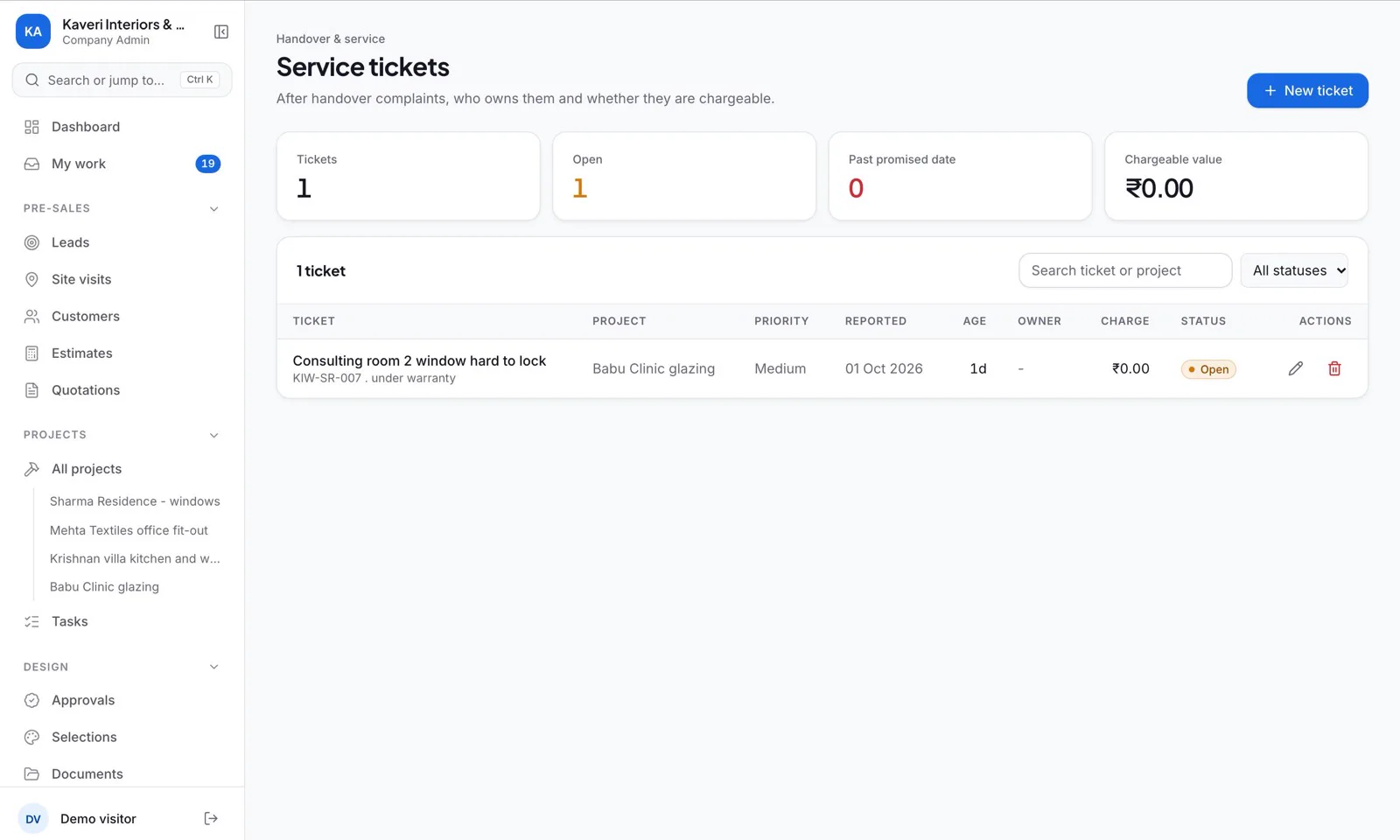
    • Each service ticket is raised against a project, with its priority, who owns it and whether it is chargeable.
    • Warranties are recorded in the same Handover & service group of the menu.
    • A service schedule holds recurring maintenance.
    demo.inbecto.com
    Inbecto service tickets screen for a sample company, with one open ticket for a window that is hard to lock

Also in Inbecto

Payroll and reports, then the tools that run through the whole app. Which plan includes what is shown on the Inbecto plans page (opens in a new tab).

demo.inbecto.com
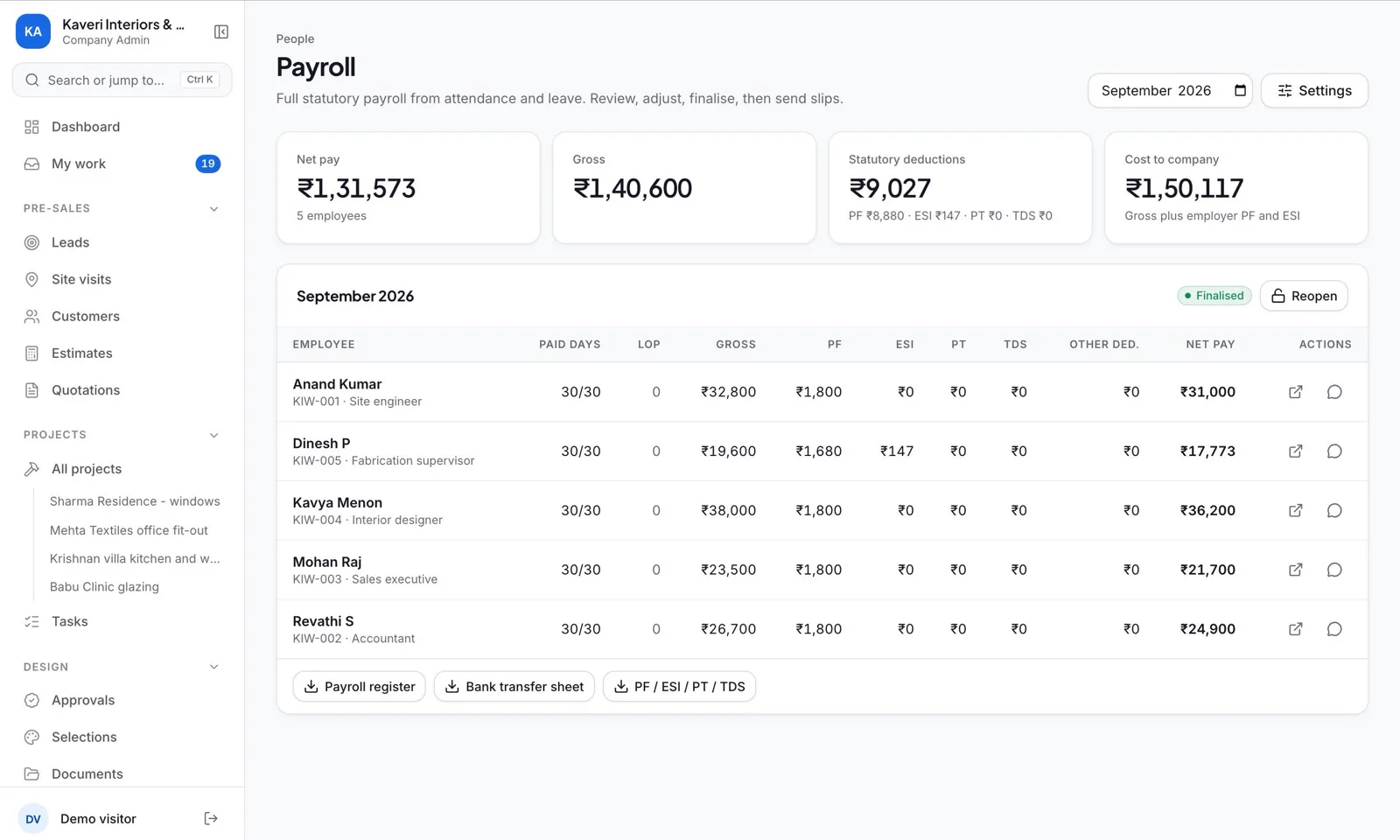
Inbecto payroll screen for a sample company, with monthly gross, statutory deductions and net pay for five employees

People and payroll

Attendance, leave and salary run from the same place as the jobs.

  • Staff check in from their phone, with their location. You can set the check-in places, and strict mode is optional.
  • Leave is applied for and approved in the app.
  • Monthly payroll works out PF, ESI, professional tax and TDS, and salary slips go out as private links.
  • If you do not need the statutory parts, switch to simple payroll.
demo.inbecto.com
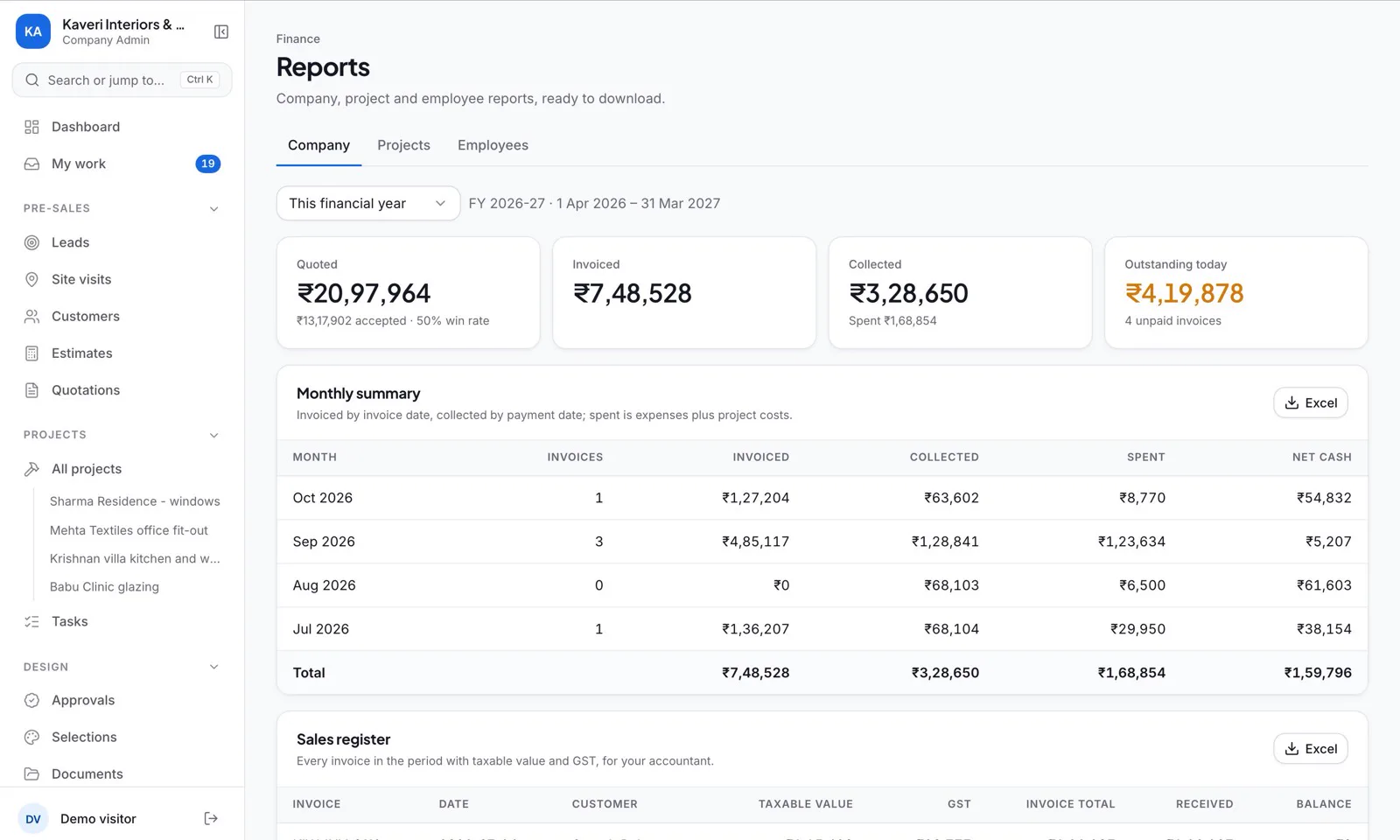
Inbecto reports screen for a sample company, with quoted, invoiced, collected and outstanding totals, a monthly summary and Excel download buttons

Reports

The figures an owner and an accountant ask for, as Excel files.

  • Monthly summary, GST sales register, unpaid invoices by age, spending by head and profit on every project.
  • Attendance, payroll register and leave.
  • Each one downloads as an Excel file for any period you choose.

Across the whole app

Dashboard
Invoiced this month, outstanding, spent, open quotations and open leads on one screen, with a six-month chart of invoiced, collected and spent, the lead pipeline, projects, site visits and tasks.
Menu
The sidebar groups pages as Pre-sales, Projects, Design, Procurement, Site, Finance, Handover & service, People and Setup, and folds down to an icon rail. A company admin can hide the pages your work does not need.
Ctrl+K search
Press Ctrl+K (Cmd+K on a Mac) to open any page or project, or to start a new quotation, invoice, customer or employee without hunting through the menu.
My work
One list of everything waiting on you: follow-ups due, tasks due or overdue, today’s and tomorrow’s site visits, quotations sent a week ago without a reply, overdue invoices, leave and expenses to approve, and designs waiting on the client. The count shows in the sidebar, and it works on a phone.
Product Master and bulk import
Products, rates and HSN codes in one place. Import them from a spreadsheet using the template, and get a report of the rows that need fixing. Customers can be imported too.
Your own branding
Add your company branding to the documents you send. Quotations come out as branded pages on your letterhead.
Roles and your own workspace
Roles decide who sees money, payroll and settings. Each company has its own private workspace, and the database only returns that company’s records to its team.
Site cameras (beta)
Connect a site camera, either a phone used as a camera or an IP or office camera, and get snapshots with an AI summary of site activity. This part is in beta.
On a phone

Much of a project happens away from a desk. Inbecto works on a phone, so the people on site, the owner and the customer each get the part that is theirs.

Staff on site
Check in from the phone, then open My work to see the tasks and site visits waiting for them.
Owners
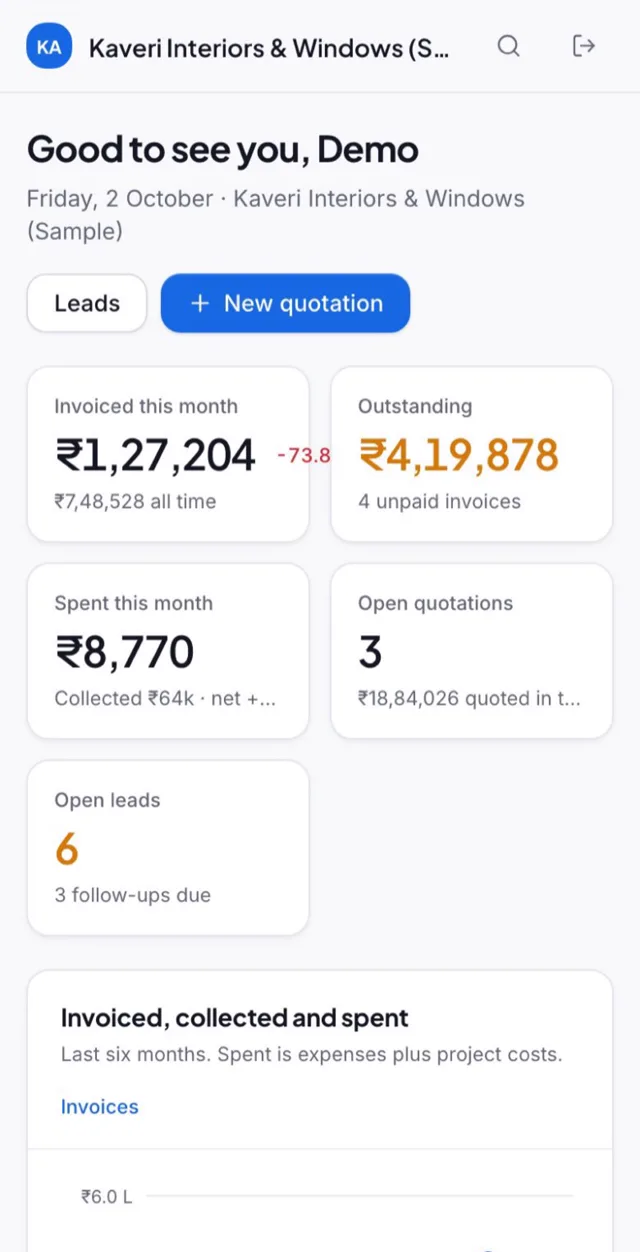
Open the dashboard to see what has been invoiced this month, what is outstanding, what has been spent, and what is waiting on you in My work.
Customers
Customers open quotations and invoices from a private link on any phone, with no login. Staff get their salary slips the same way.
Inbecto dashboard on a phone for a sample company, with invoiced this month, outstanding, spent, open quotations and open leads

The dashboard on a phone, demo company.

Inbecto in eight short loops

Silent clips, each under 20 seconds. They play as they scroll into view. If your device is set to reduce motion, they wait for you to press play.

  • One job, enquiry to profit
  • One line draws the whole quotation
  • From scattered chats to one tap
  • Quotations on your own letterhead
  • Jump anywhere with Ctrl K
  • Payday without the spreadsheet
  • Everything waiting on you
  • From design approval to handover

Who Inbecto is for

Inbecto is built around four kinds of work. A firm that makes windows and also fits out interiors can use both Fenestration and Turnkey, and the menu shows only the pages its work needs.

Fenestration
UPVC and aluminium window and door makers. Quotations with a drawing for every opening, costing by profile, glass and hardware, and an estimate of offcut wastage on UPVC jobs.
Turnkey
Interior and construction companies that carry a job from design to handover. Design approvals, purchasing, work orders, site reports, wage workers and service after handover all sit with the project.
Kitchens
Modular kitchen businesses. Quote from your own product list and rates, run each kitchen as a project, and see what it cost against what you sold it for.
Furniture
Furniture makers and workshops. Quote from your product list, order materials from vendors, track wage workers, and invoice with GST.

Getting started

Three steps, and the first one needs no sign-up.

  1. Step 1

    Open the demo

    Look around a working sample company, Kaveri Interiors & Windows, with leads, quotations, projects, invoices and payroll already in it. No sign-in is needed, and nothing you change is saved.

    Go to demo.inbecto.com (opens in a new tab)
  2. Step 2

    Start your free month

    Sign up and use your own customers and rates. There is no card to enter and no setup fee, and you can cancel any time.

    Sign up at inbecto.com (opens in a new tab)
  3. Step 3

    Set up your workspace

    Your company gets its own private workspace at its own address. If your plan includes bulk import, bring in your products, rates and customers from a spreadsheet instead of typing them again.

    Read the user guide (PDF) (opens in a new tab)

Each plan has one price for the whole company, and larger teams are set up by Lywin on request. See plans and pricing (opens in a new tab).

Questions people ask about Inbecto

Something not covered here? Write to support@lywin.tech.

Do I need an account to try Inbecto?

No. The demo opens with no sign-in, so you can click through a sample company before you decide.

How much does the first month cost?

Nothing. The first month is free on every plan, with no card and no setup fee, and you can cancel any time. After that, each plan has one price for the whole company, shown on the Inbecto plans page.

What kinds of business is Inbecto for?

Interior designers, window and door makers, kitchen and furniture makers, turnkey and construction companies, contractors and renovation businesses. Inbecto groups the work into four segments, Fenestration, Turnkey, Kitchens and Furniture, and a company can use more than one.

Can it draw the windows on a quotation?

Yes. For a window or door you choose the style, panels, tracks, mesh, top light and fan cut-out, and the drawing updates as you go. You can upload your own drawing instead. A UPVC window quotation prints one block per window with its drawing, sizes, profile, glass and hardware.

Can I see the profit on each project?

Yes. Each project has a costing sheet where you record what the job cost, from profile and glass to labour, freight and installation. Inbecto sets the total against the price you sold at and the money received, and shows the margin. A report lists the profit on every project. For UPVC jobs it also estimates offcut wastage by weight.

Does it handle GST invoices and e-way bills?

Yes. Tax invoices carry HSN or SAC codes and GST. For an e-way bill, Inbecto prepares the JSON file that you upload to the government portal. Type the 12-digit number back into the invoice and it prints there from then on.

Do my customers need to log in to see a quotation?

No. Share the quotation on WhatsApp and the customer opens it from a private link on any phone, with no login. Invoices and salary slips work the same way.

Can it run attendance and payroll?

Yes. Staff check in from their phone with their location, apply for leave in the app, and leave is approved there too. Monthly payroll works out PF, ESI, professional tax and TDS, and salary slips go out as private links. If you do not need the statutory parts, switch to simple payroll.

Is my company’s data kept apart from other companies?

Yes. Each company has its own private workspace at its own address, such as yourcompany.inbecto.com, and the database only returns that company’s records to its team. Roles decide who sees money, payroll and settings.

Can I bring in my product list and customers from a spreadsheet?

Yes. Fill in the template with your products, rates and HSN codes and import it. You get a report of any rows that need fixing. Customers can be imported too. The plans page shows which plans include bulk import.

Talk to us before you start.

Ask about a segment, a plan, importing your data, or anything the demo does not show.